Overview
The Advanced Settings section allows the admin to manage Application Grouping Rules and Website Grouping Rules for better tracking and reporting.Application Grouping Rules
Group similar applications under one category to make reports easier to analyse.How to Add an Application Grouping Rule
- Go to Settings → Advanced Settings
- Select the Application Grouping Rules tab
- Click + Add Rule
- Enter the Group Name, Priority, and Productivity Level
- Add one or more patterns to match application names
- Enable the rule using the toggle
- Click Create to save
Website Grouping Rules
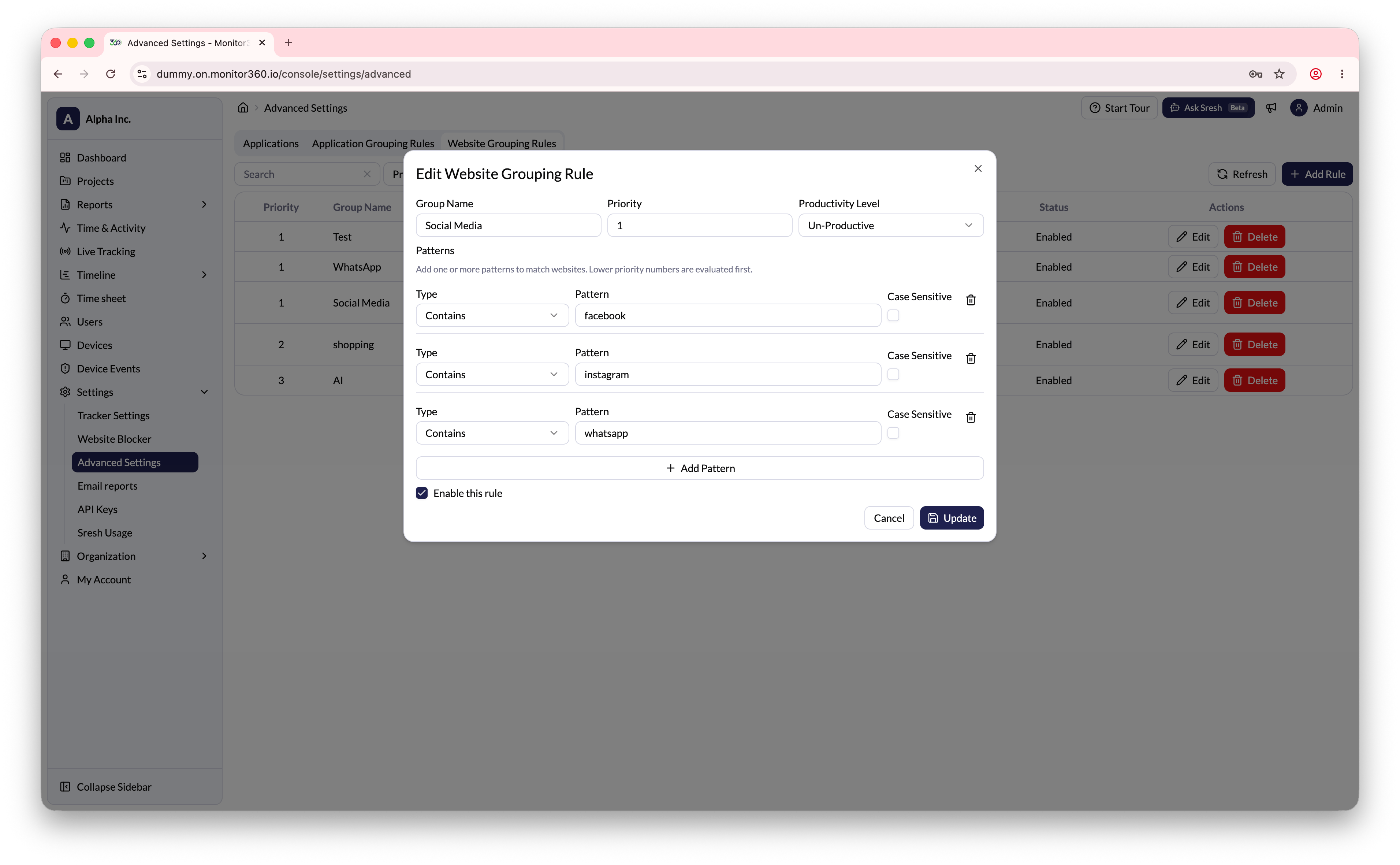
Group similar websites or domains under one category.How to Add a Website Grouping Rule
- Go to Settings → Advanced Settings
- Select the Website Grouping Rules tab
- Click + Add Rule
- Enter the Group Name, Priority, and Productivity Level
- Set the match Type (e.g., Contains) and enter the domain Pattern (e.g.,
facebook.com) - Enable the Case Sensitive option if needed
- Enable the rule using the toggle
- Click Create to save