

Overview
The Shifts section allows the admin to create and manage employee working hour schedules, including start and end times and weekly off days.Default shift
One shift is always the default. It is assigned automatically to any user without a shift. The default shift cannot be deleted, but you can edit it or make another shift the default.How to create a shift
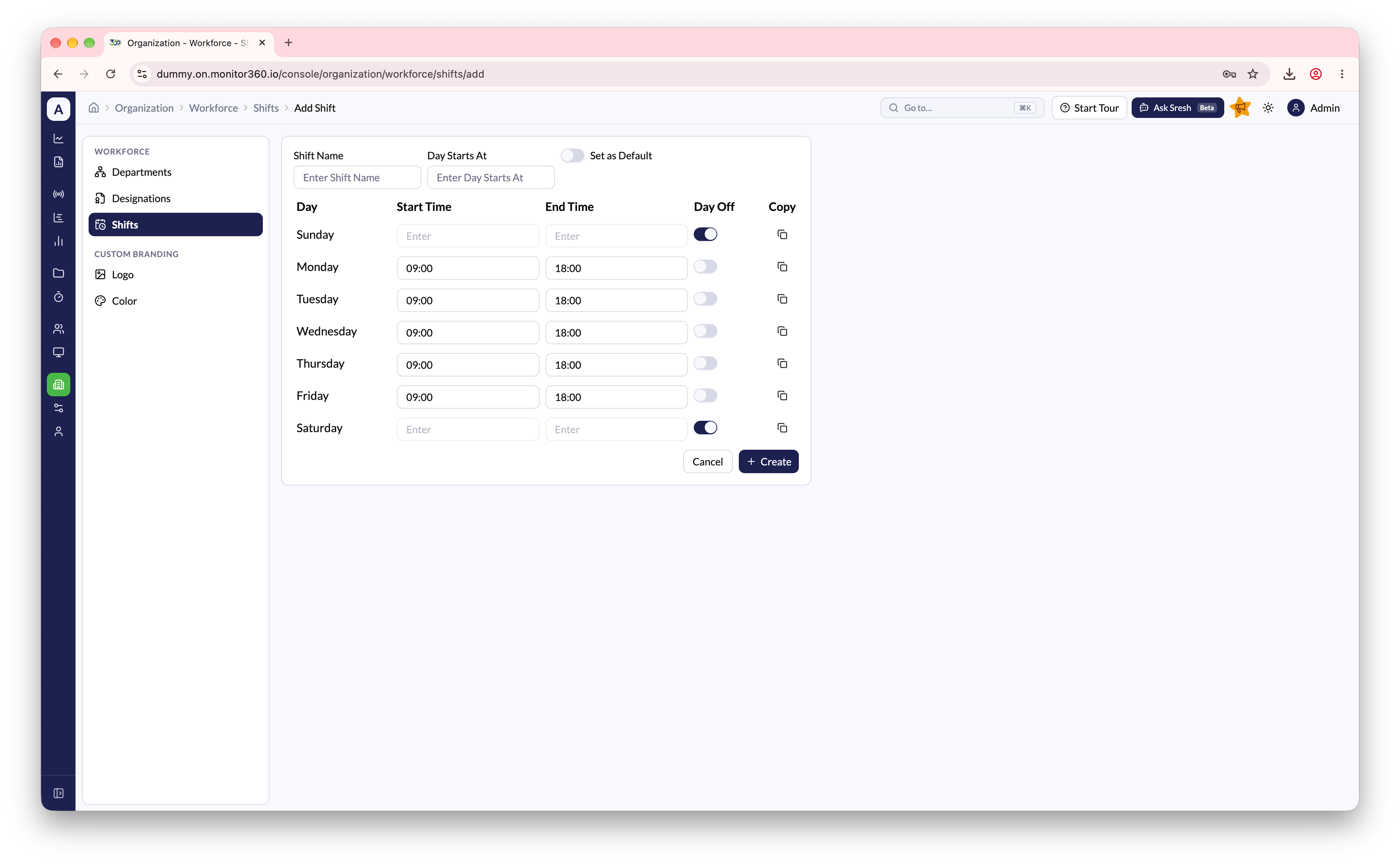
- Go to Organization → Workforce → Shifts
- Click Add Shift
- Enter the Shift Name (for example, Morning Shift or Night Shift)
- Set Day Starts At (see below)
- For each working day, set the Start Time and End Time
- Enable Day Off for weekly off days (for example, Saturday and Sunday)
- Use the Copy option to apply the same timing to other days
- Turn on Set as Default if this shift should be assigned to users without a shift
- Click Create to save
Day Starts At
Day Starts At sets the time at which one working day ends and the next begins. Activity is split into days at this time.00:00- days split at midnight (the usual setting)06:00- days start at 6 AM. Use this for overnight shifts, so work from 10 PM to 4 AM counts as a single day