> ## Documentation Index
> Fetch the complete documentation index at: https://docs.monitor360.io/llms.txt
> Use this file to discover all available pages before exploring further.
# Shifts
> Create and manage employee working hours and weekly offs
## Overview
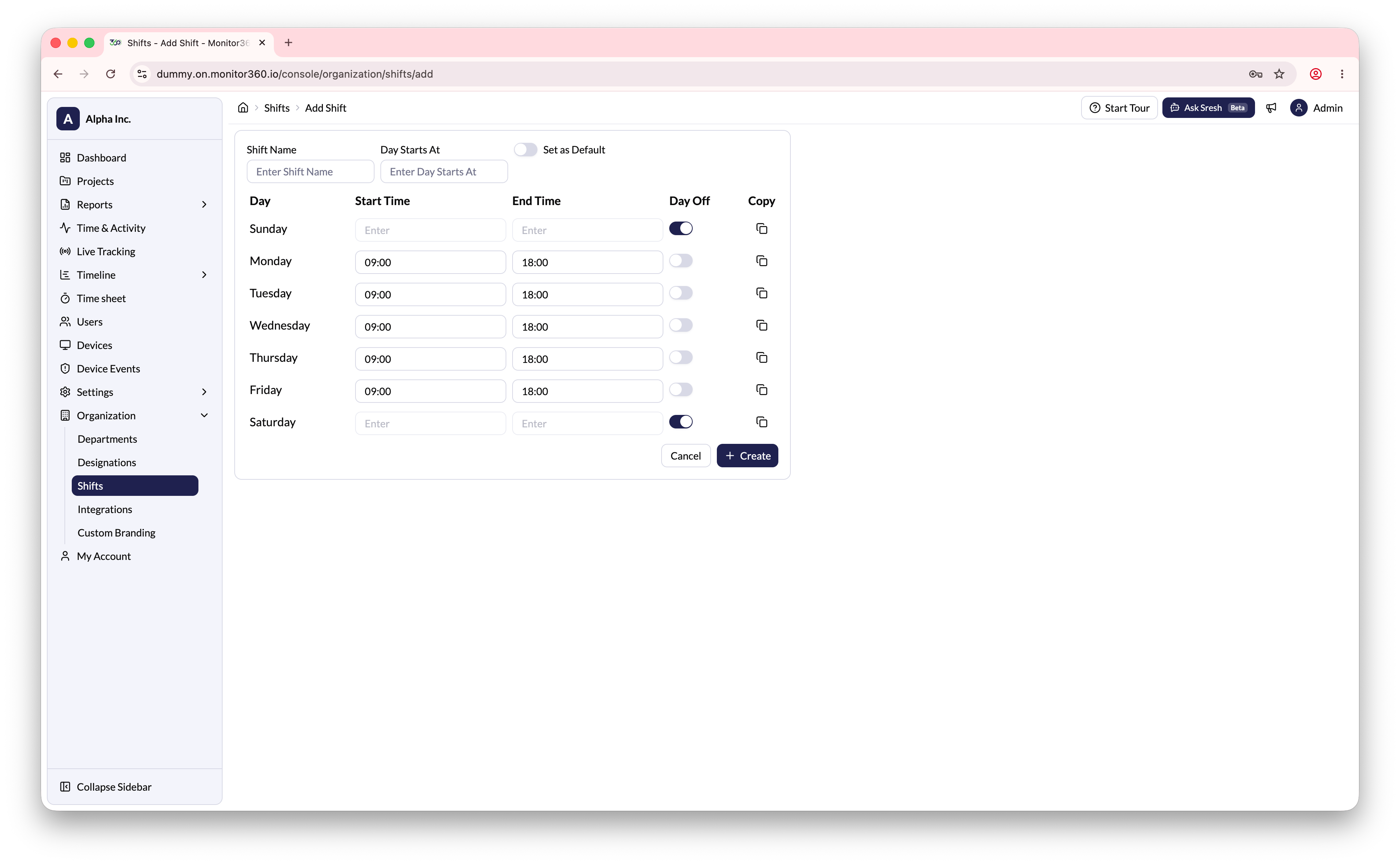
The **Shifts** section allows the admin to create and manage employee working hour schedules, including start/end times and weekly off days.
## Default Shift
A **Default Shift** is already available in the system. The default shift cannot be deleted, but it can be edited to update working hours and weekly offs.
## How to Create a Shift
1. Go to **Organization → Shifts**
2. Click **Add Shift**
3. Enter the **Shift Name** and **Day Starts At** time
4. For each working day, set the **Start Time** and **End Time**
5. Enable **Day Off** for weekly off days (e.g., Saturday, Sunday)
6. Use the **Copy** option to duplicate the same timing to other days
7. Click **Create** to save
 Shifts are used to determine when tracking should occur and to calculate
accurate work hours in reports. Assign the correct shift to each user during
account setup.
Shifts are used to determine when tracking should occur and to calculate
accurate work hours in reports. Assign the correct shift to each user during
account setup.