> ## Documentation Index
> Fetch the complete documentation index at: https://docs.monitor360.io/llms.txt
> Use this file to discover all available pages before exploring further.
# Advanced Settings
> Configure application and website grouping rules for better tracking and reporting
## Overview
The **Advanced Settings** section allows the admin to manage **Application Grouping Rules** and **Website Grouping Rules** for better tracking and reporting.
## Application Grouping Rules
Group similar applications under one category to make reports easier to analyse.
### How to Add an Application Grouping Rule
1. Go to **Settings → Advanced Settings**
2. Select the **Application Grouping Rules** tab
3. Click **+ Add Rule**
4. Enter the **Group Name**, **Priority**, and **Productivity Level**
5. Add one or more **patterns** to match application names
6. Enable the rule using the toggle
7. Click **Create** to save
## Website Grouping Rules
Group similar websites or domains under one category.
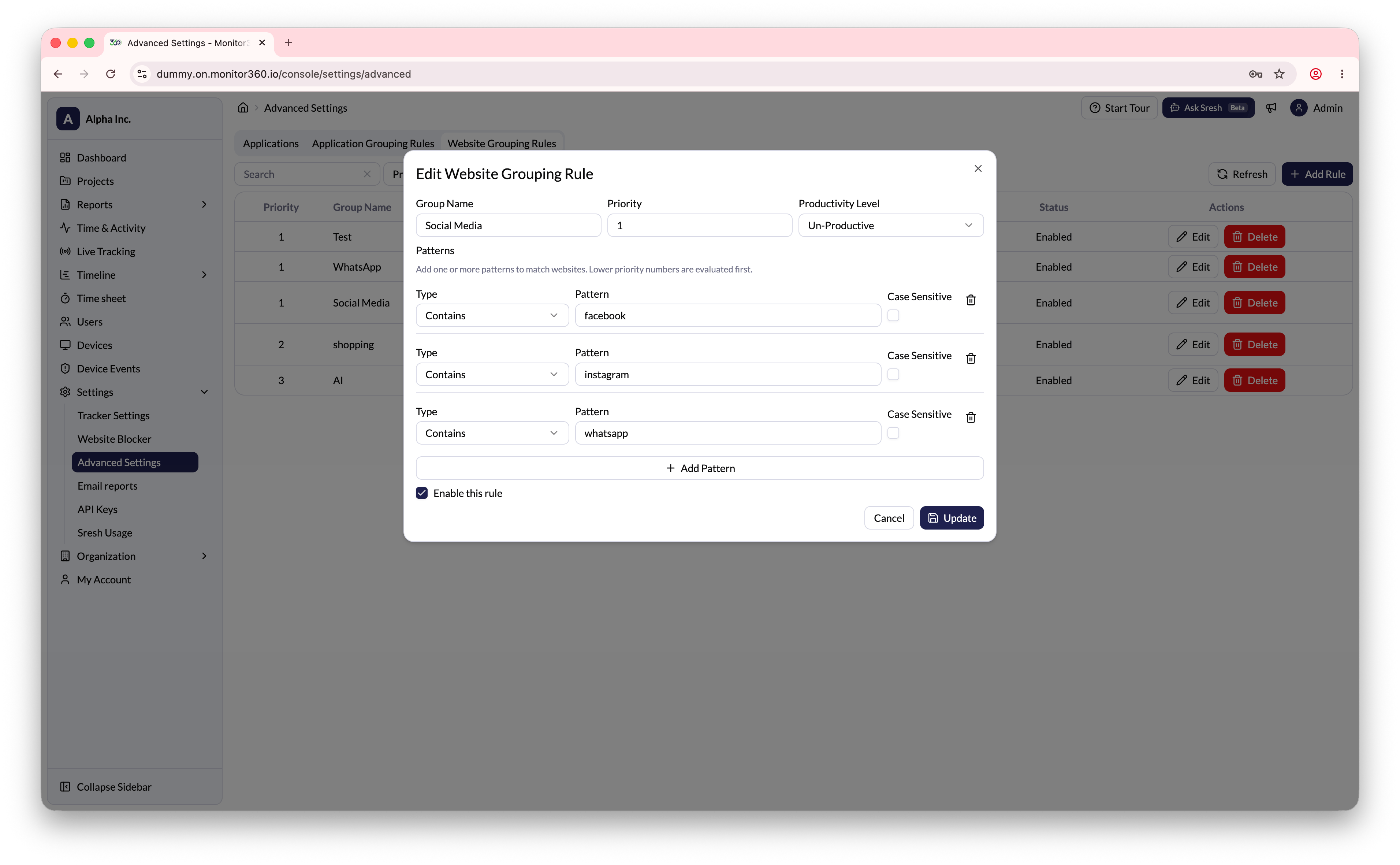
### How to Add a Website Grouping Rule
1. Go to **Settings → Advanced Settings**
2. Select the **Website Grouping Rules** tab
3. Click **+ Add Rule**
4. Enter the **Group Name**, **Priority**, and **Productivity Level**
5. Set the match **Type** (e.g., Contains) and enter the domain **Pattern** (e.g., `facebook.com`)
6. Enable the **Case Sensitive** option if needed
7. Enable the rule using the toggle
8. Click **Create** to save
 ## Fields Explained
| Field | Description |
| ------------------ | ----------------------------------------------------------- |
| Group Name | The label used to categorise apps or websites |
| Priority | Lower numbers are evaluated first when multiple rules match |
| Productivity Level | Classify as Productive, Neutral, or Unproductive |
| Pattern | The app name or domain string to match against |
| Case Sensitive | Whether the pattern match is case-sensitive |
Use grouping rules to consolidate similar tools (e.g., group all communication
apps under "Messaging") and set appropriate productivity levels for cleaner
reporting.
## Fields Explained
| Field | Description |
| ------------------ | ----------------------------------------------------------- |
| Group Name | The label used to categorise apps or websites |
| Priority | Lower numbers are evaluated first when multiple rules match |
| Productivity Level | Classify as Productive, Neutral, or Unproductive |
| Pattern | The app name or domain string to match against |
| Case Sensitive | Whether the pattern match is case-sensitive |
Use grouping rules to consolidate similar tools (e.g., group all communication
apps under "Messaging") and set appropriate productivity levels for cleaner
reporting.